SFM Compile Guide: How to Compile Models in Source Filmmaker
If you typed “sfm compile” into Google, you are not looking for slang. You want to know how to turn raw model, texture or map files into something Source Filmmaker can actually load. That process is called compiling, and it trips up almost every new SFM user. One wrong folder or one missing line in a text file can leave you with a pink and black checkerboard or a long list of errors.
This guide explains what SFM compile means and why it matters. You will learn the tools you need and the exact steps to compile a model with Crowbar. You will also see how textures and maps work and how to fix the most common errors. Every step is written in plain language so you can follow along even if you have never touched a QC file.
What Does SFM Compile Mean?
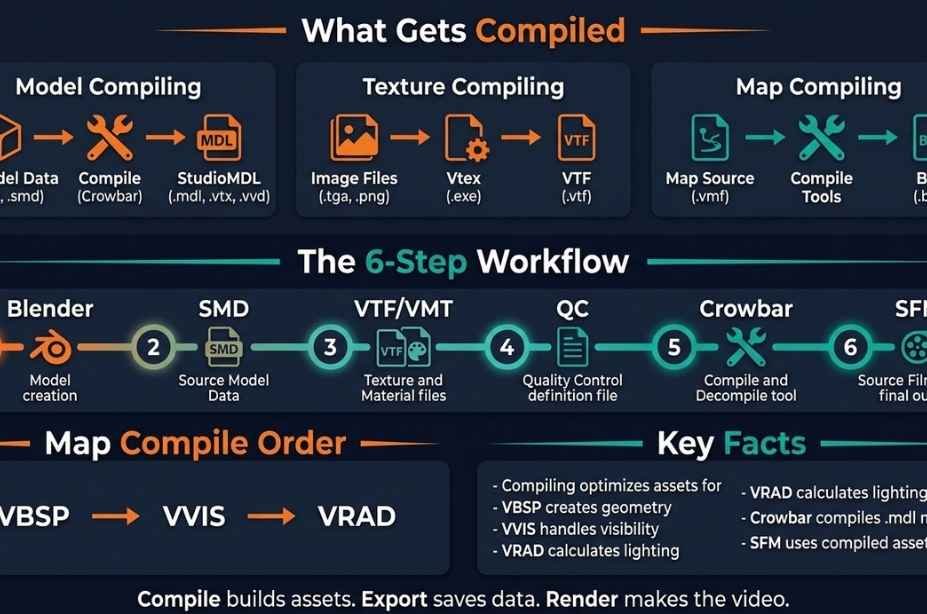
SFM compile means converting source files like SMD, DMX, QC and image files into game ready formats that Source Filmmaker can read. Models become MDL files. Textures become VTF and VMT files. Maps become BSP files. You compile with outside tools such as Crowbar because SFM has no built in compile button.
What “SFM Compile” Really Refers To
Many keyword guides treat short phrases like this as texting slang. This one is not slang. It is a technical term used by animators and modders in the Source Filmmaker community. Searchers usually want one of four things.
Compiling a Model
This is the most common meaning. You made or downloaded a 3D model and need to turn it into an MDL file. Without that step SFM will never see the model in its model browser.
Compiling a Texture
Textures need a special format. You turn PNG, TGA or PSD images into VTF files and pair them with VMT files. The VMT file tells the engine how the surface should look and behave.
Compiling a Map
Maps built in Hammer must pass through a set of tools before they work as BSP files. This process builds the geometry and visibility and the lighting.
Rendering a Movie
Some people say “compile” when they mean exporting their finished film. That is really called rendering or exporting. It is a different job and uses a different menu inside SFM.
This article focuses on the first three meanings because they are what most people searching for this term need.
Where the Term Comes From
Source Filmmaker is a free animation tool from Valve. The company built it in house to make animated shorts for Team Fortress 2 and later released it to the public in 2012. SFM runs on the Source engine. That engine is the same technology behind Half Life 2 and Counter Strike Source and many other classic games.
The Source engine does not read common 3D files directly. Artists work in programs like Blender or 3ds Max. Those programs export plain data files. The engine needs a packed and optimized version of that data. A tool called studiomdl does the packing. Valve calls that step compiling. The name comes from software development where source code is compiled into a program that a computer can run.
According to the Valve Developer Community wiki, studiomdl reads a QC script and the files it points to. It then writes out the model files that the engine needs. That is the heart of every SFM compile. Everything else in this guide is just a friendly way to run that tool.
What You Need Before You Compile
Gather your tools first. Missing one piece is the top reason compiles fail.
- Source Filmmaker installed through Steam
- Crowbar, a free tool made by ZeqMacaw
- Blender with the Blender Source Tools add on
- VTFEdit or a similar tool for textures
- A text editor like Notepad or Notepad Plus Plus
- Your model files in SMD or DMX format
Crowbar is the star here. It gives you a simple window instead of a command line. It has tabs for decompiling and compiling and viewing and packing. Its documentation on GitHub explains each option in detail and is worth a quick read.
Blender Source Tools lets Blender export SMD and DMX files. Without this add on you cannot make files that studiomdl understands. Install it through the Blender preferences menu and enable it.
Understanding the Files You Are Compiling
A compile touches several file types. Knowing what each one does makes errors easier to read.
- SMD or DMX files hold meshes and bones and animation data
- QC files are text scripts that tell studiomdl what to build
- VTF files are the actual texture images
- VMT files are small text files that define a material
- MDL files are the finished model
Think of the QC file as a recipe. The SMD files are the ingredients. The MDL file is the finished meal. If the recipe points to an ingredient that does not exist the cook stops and complains.
How to Compile a Model in SFM Using Crowbar
Here is the full process from start to finish. Take it one step at a time.
Step 1: Set Up Crowbar
Open Crowbar and go to the Set Up Games tab. Pick Source Filmmaker from the game dropdown. Crowbar should find the correct files on its own. It looks for the gameinfo file inside the usermod folder and for studiomdl inside the bin folder. If it cannot find them you can browse to them by hand.
Your SFM install usually lives in a path like this:
SteamLibrary\steamapps\common\SourceFilmmaker\game
Always use the usermod folder for custom content. It is built for mods and keeps your files apart from Valve content.
Step 2: Prepare Your Export
Export your mesh from Blender as an SMD file. Many artists make two kinds of files. One is a reference mesh that holds the model shape. The other is an idle animation that holds the pose. If your model is simple you can use the same file for both.
Keep file names short and simple. Avoid spaces and odd symbols. Source tools can behave badly with unusual characters.
Step 3: Write the QC File
Open a text editor and create a new file. Save it with the .qc ending. Here is a basic example for a static prop:
$modelname “props/crate.mdl”
$body studio “crate_ref.smd”
$cdmaterials “models/props/”
$sequence idle “crate_ref.smd” loop fps 30
Each line has a job. The first line sets the name and folder of the final model. The second line picks the mesh. The third line tells the engine where to look for materials. The fourth line creates a basic animation so the model has at least one sequence.
Do not skip the sequence line. Models with no sequence often fail or look broken in game.
Step 4: Arrange Your Folders
Put your QC and SMD files in one working folder. Keep your textures ready for the materials folder. A clean layout looks like this:
- Working folder holds the QC and all SMD files
- usermod\materials\models\props holds the VTF and VMT files
- usermod\models\props receives the compiled model
Matching the folder names in your QC file to the real folders is the key to success.
Step 5: Run the Compile
Follow these steps inside Crowbar:
- Open the Compile tab in Crowbar.
- Browse to your QC file in the input box.
- Choose where the output should go.
- Pick Source Filmmaker as the game.
- Press the Compile button and watch the log.
A green message that says the compile finished means success. If you see red text you have an error to fix. Read the log from the bottom up. The last lines usually name the problem.
Step 6: Test in SFM
Open Source Filmmaker and start a new session. Go to the Model tab in the Animation Set Editor. Find your model by its folder path. Drag it into the scene. If it shows up with the right shape and textures you are done.
Tip: use the Crowbar View tab first. It shows the model in a quick preview and saves you from opening SFM for every small test.
How to Compile Textures for SFM
Textures need two files. You must make both.
Make the VTF
Open VTFEdit and import your image. Use sizes that are powers of two such as 512 by 512 or 1024 by 1024. Save the file as a VTF. Use DXT1 for images without transparency. Use DXT5 for images with an alpha channel.
Make the VMT
A VMT is plain text. A simple one looks like this:
“VertexLitGeneric”
{
“$basetexture” “models/props/crate_diffuse”
}
The path points to the VTF file but leaves off the extension. It starts from the materials folder. So the file above lives at materials\models\props\crate_diffuse.vtf.
For shiny or detailed surfaces you can add normal maps and phong settings and more. Start simple. Get the base texture working first. Then add extras one at a time.
Match Names in Your QC
The material name inside your SMD must match your VMT file name. The folder comes from the cdmaterials line in your QC. If any piece does not match you will see the dreaded pink and black checkerboard.
How to Compile a Map for SFM
Maps follow a different path. You build them in Hammer, which is part of the Source SDK tools. When you press Run Map in Hammer it calls three programs in order.
- VBSP builds the basic world geometry
- VVIS works out what can be seen from where
- VRAD bakes the lighting into the map
The output is a BSP file. Copy it into the maps folder inside usermod and SFM will find it. Many map makers also use a fast compile setting for tests. This skips heavy lighting work and saves time. Switch to a full compile only when the map is ready for final use. Final lighting can take a long time on large maps.
Pay attention to leaks. A leak is a gap in the sealed map shell. If the map leaks then VVIS and VRAD cannot work correctly. Hammer will show you a leak line to follow. Fix the hole and compile again.
Common SFM Compile Errors and How to Fix Them
Every artist hits errors. Here are the usual suspects.
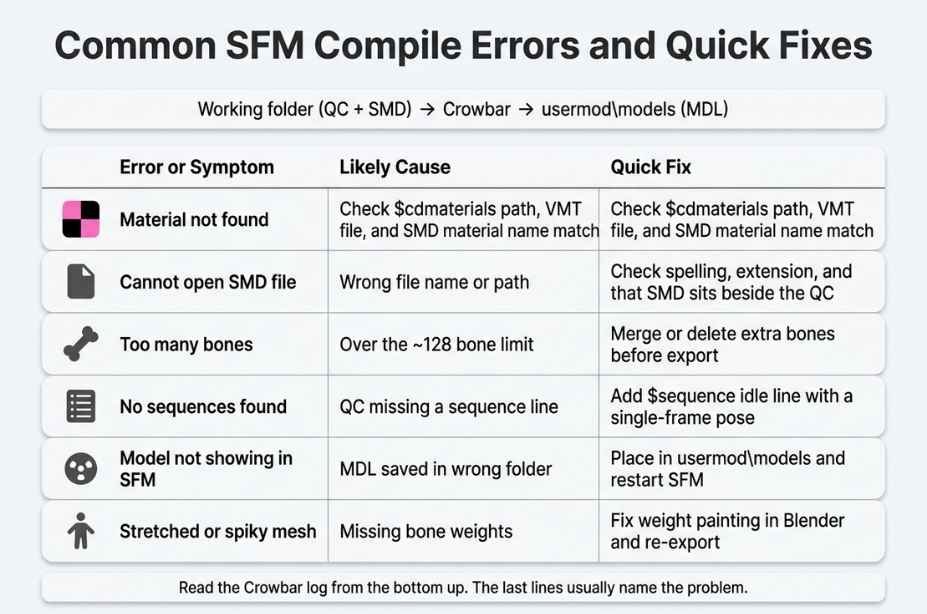
Pink and Black Checkerboard
This means the engine cannot find the material. Check the cdmaterials line in your QC. Check that the VMT exists in the right folder. Check that the name in the SMD matches the VMT name.
Cannot Open SMD File
The QC points to a file that is not there. Check spelling and file extension. Make sure the SMD sits in the same folder as the QC or fix the path in the script.
Too Many Bones
Source models have a limit of around 128 bones in most builds. Complex rigs with extra helper bones can go over the limit. Merge or delete bones you do not need before you export.
No Sequences Found
Your QC is missing a sequence line. Add one like the example earlier. Even a single frame idle pose is enough.
Model Does Not Show in SFM
Check that the MDL landed inside usermod\models. If it went somewhere else SFM will not list it. Restart SFM after a compile because it only reads the folder list on startup in some cases.
Studiomdl Not Found
Crowbar cannot see the compiler. Go back to Set Up Games and point it to the correct bin folder. Make sure SFM is fully installed and not just partly downloaded.
Weird Stretching or Spiky Meshes
This is usually a weight painting problem. Vertices without proper bone weights get pulled to the world origin. Fix the weights in Blender and export again.
Tips for Cleaner and Faster Compiles
Small habits save hours. Here are the ones that matter most.
- Keep one folder per project for all raw files
- Name models and materials in lowercase
- Test with a simple version before adding detail
- Save a backup of your QC before big changes
- Read the full Crowbar log every time
- Compile often rather than once at the end
Lowercase naming matters more than you might think. Some tools treat uppercase and lowercase as different names. Using only lowercase removes a whole class of strange bugs.
Also think about polygon count. SFM handles high detail models well because it is a film tool and not a real time game. Still very heavy models slow down your viewport. A model with a reasonable triangle count keeps your scene smooth while you animate.
Another smart move is to build body groups. These let you swap parts such as hats or weapons without making a new model. You add them in the QC with the bodygroup command. It takes a little extra setup but pays off when you animate with many options.
Compile vs Export vs Render: Clearing Up the Confusion
Beginners often mix up three words. Here is the difference.
- Compile builds game ready assets from raw files
- Export saves data out of a program such as Blender
- Render turns your SFM scene into a finished video
You export from Blender. You compile with Crowbar. You render from SFM. Each step feeds the next one. If someone tells you to compile your movie they mean render it. Look for the Export Movie option in the SFM File menu. It lets you choose an image sequence or a video file. Many animators pick an image sequence because it is safer. If a render crashes you do not lose the frames that already finished.
Why Learning to Compile Matters
You can animate in SFM without ever compiling. The Steam Workshop has thousands of ready made models and maps. So why bother with the process?
First you get freedom. You can bring in characters from other games or your own original designs. Second you can fix broken models. Many older community models have missing textures or odd bone names. With Crowbar you can decompile a model and fix the problem and compile it again. Third you can optimize. You can shrink textures or remove unused parts to make a model lighter.
The Source modding scene has been alive for well over a decade. That long history means there are guides and forums and video tutorials for almost every problem you will meet. Your compile errors have probably been solved before. A quick search with the exact error text often leads to the answer.
A Simple Workflow to Remember
Here is the whole process in six short lines.
- Make or edit your model in Blender.
- Export SMD files with Blender Source Tools.
- Create textures as VTF and VMT files.
- Write a QC file with name and body and materials.
- Compile with Crowbar using the SFM game setup.
- Load the model in SFM and check it.
Print this list or keep it in a note. After two or three projects you will do it from memory.
Conclusion
SFM compile is not slang and it is not magic. It is the step that turns raw art files into assets the Source engine understands. Models need a QC script and a tool like Crowbar. Textures need VTF and VMT files. Maps need Hammer and the VBSP and VVIS and VRAD tools. Rendering your finished film is a different task that happens inside SFM itself.
Your best takeaway is to stay organized. Keep clean folders and use lowercase names and read your logs. Start with a simple prop and get it working before you try a full character. Once your first model appears in the viewport you will see how logical the process is. After that every new compile gets faster and easier.
Frequently Asked Questions About SFM Compile
What does compile mean in SFM?
It means converting raw model and texture and map files into formats Source Filmmaker can load. Tools like Crowbar run studiomdl to build the final MDL files.
How do I compile a model for SFM?
Set up Crowbar with the SFM game profile and write a QC file and compile it. Then copy or output the MDL into the usermod models folder.
Do I need Crowbar to compile for SFM?
No but it is the easiest way. You can run studiomdl from the command line. Crowbar adds a friendly window and clear logs and saves you from typing commands.
Why is my SFM model pink and black?
The engine cannot find the material. Check that your VMT and VTF files exist and that the cdmaterials path in your QC matches the folder.
Where do compiled SFM models go?
They belong in the usermod models folder inside your SFM game directory. SFM scans that location and lists the model in the model browse.